
Inventory management for phone and accessory stores
Screen protectors, cases, parts and phones in one inventory. Stock updates itself with every sale and repair, and used phones are tracked by IMEI from purchase to sale.
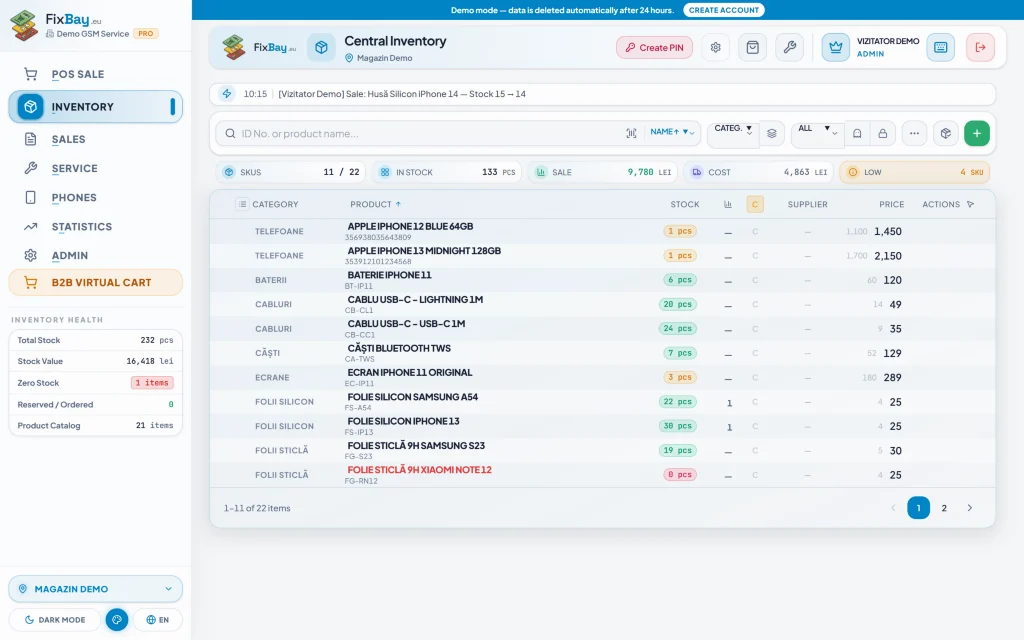
Know what is on the shelf and what no longer sells
The inventory shows stock per location, prices and a full history for every item. Alerts warn you when a product drops below its minimum and when it has sat untouched for too long, so you do not have cash tied up in goods nobody buys any more.
- Barcodes and scanning with the phone camera
- Low-stock alerts, dead stock and reserved stock
- Stock counts and a full history for every item
- Shelf and thermal labels
Excel import instead of retyping
If your stock already lives in an Excel file, import it and the app creates the categories and suppliers for you. You can start working the same day without retyping products one by one.
Used phones by IMEI, with trade-ins and consignment
Every handset has its own record: IMEI and serial number, condition, purchase price and history. For trade-ins you print the purchase slip, and for consignment you keep track of settlements with the owner. These modules are included in the PRO plan.
Several shops, the same data
Stock, repairs and sales are kept per location, yet you see them all from one account. Changes appear instantly on other terminals without reloading the page.
Physical stock counts without the chaos
A stock count helps you match the stock in the app with what is on the shelf. You scan items with the phone camera or a barcode reader instead of writing everything on paper and retyping the numbers the next day.
Every product has a full history. When a figure does not add up, you open the product and look at its movements: sales, parts used in repairs, receipts. The gap stops being a guessing game and becomes something you can trace to its source.
Shelf labels and thermal labels are printed from the app with the product barcode. A properly labelled shelf makes counting faster and lowers the chance of the same item being counted under two different names.
Reserved stock, dead stock and tied-up cash
Parts added to a repair ticket are reserved from the inventory. That way you can see which parts are already committed to repairs, and the reserved-stock alert shows how much of your goods is already set aside.
Low-stock alerts warn you before you run out of cases, protectors or parts that sell every day. The dead-stock alert does the opposite: it surfaces products that sit untouched so you can decide whether to cut the price, move them to another location or stop reordering.
The reports show the cash tied up in stock, your best sellers and real profit. On the ULTRA plan, AI restocking advice uses your own Gemini key; it is a suggestion you may or may not follow, not an automatic order.
Trade-ins and consignment in practice
For a trade-in you enter the phone with its IMEI, serial number, condition and purchase price, then print the purchase slip. From then on the phone has its own record and you can follow it all the way to the sale, including the price you paid for it.
With consignment, the phone stays the owner's until it sells. The app keeps track of settlements with the owner and lets you print the consignment agreement, so you no longer work out by hand who is owed what.
The used-phone, trade-in and consignment modules are included from the PRO plan upwards. If you only sell accessories and parts you do not need them and can leave them switched off.
From notebook or spreadsheet to the app in a day
There are only a few steps: create your account, import your stock from Excel or add it with a barcode reader, and start working. Categories and suppliers are created automatically from the file, so you do not lose an afternoon just on setup.
The free plan allows up to 100 products, enough to try the app on part of your goods. From the LITE plan, products and tickets are unlimited. The free 30-day PRO trial starts only with your first sale, so you do not use it up while you are just loading data.
Frequently asked questions
- How do I import the products I already have?
- From Excel: the app reads the file and creates any missing categories and suppliers. You can also use a barcode scanner.
- What are the free plan limits for stock?
- The FREE plan includes 1 location, 1 user (owner only), up to 100 products and 50 repair tickets a month. From LITE upwards, products and tickets are unlimited.
- Can I see the stock of all my shops at once?
- Stock is kept per location, but all locations sit in the same account. Changes sync in real time, and each location has its own colour so you do not mix them up.
- How do I track used phones?
- Each phone is kept by IMEI and serial number, with its condition, purchase price and history. Trade-ins come with a purchase slip and consignment with settlements to the owner. The modules are included from the PRO plan.